
Zero-Touch Deployment.

Effortless Device Setup.

Deploy, manage, and secure devices without lifting a finger. Increase productivity
with pre-configured devices, ready to use right out of the box.

Deploy devices anywhere.

Simplify setup, secure productivity.

Hassle-Free Setup

Devices arrive pre-configured with company policies and apps.

Increased Security

Ensure every device is secure and compliant from the moment it’s powered on.

Time-Saving

Save hours on manual device configuration and setup.

Seamless Integration

Works with popular platforms like Jamf and Microsoft Intune.

Frequently Asked Questions

Get answers to the most common technical questions about integrating, securing, and managing devices with Zero-Touch Deployment. 

OS Deployer supports three types of bootable media: PXE, USB, and ISO.

OS Deployer supports Windows-based OSs, encompassing client-based and server-based OSs. This includes OSs ranging from Windows XP to Windows 11.

Yes, you can deploy OSs to multiple machines using the multicast deployment method.

Yes, the target machines must be connected to the network.

Yes, OS Deployer supports OS migration via the zero-touch task feature.

Related Resources

Published: May 6,2025 Device as a Service : All You Need To Know According to report from Fortune Business Insights, the global
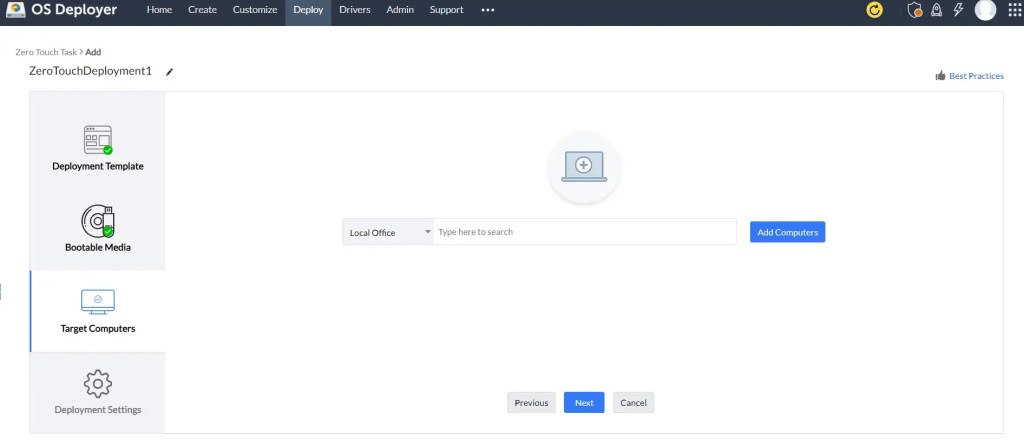

What is Zero-Touch Deployment? Setting up devices one by one is a hassle. With Zero-Touch Deployment (ZTD), businesses can skip the tedious

Explore The Latest Trends And Exciting Developments of Device as a Service (DaaS) In today’s digital world, Device-as-a-Service (DaaS) is revolutionizing how

Ready to streamline your device deployment?

Contact us today to learn more or schedule a demo!

Zero-Touch Deployment.

Effortless Device Setup.

Deploy, manage, and secure devices without lifting a finger. Increase productivity
with pre-configured devices, ready to use right out of the box.

Deploy devices anywhere.

Simplify setup, secure productivity.

Hassle-Free Setup

Devices arrive pre-configured with company policies and apps.

Increased Security

Ensure every device is secure and compliant from the moment it’s powered on.

Time-Saving

Save hours on manual device configuration and setup.

Seamless Integration

Works with popular platforms like Jamf and Microsoft Intune.

Frequently Asked Questions

Get answers to the most common technical questions about integrating, securing, and managing devices with Zero-Touch Deployment. 

OS Deployer supports three types of bootable media: PXE, USB, and ISO.

OS Deployer supports Windows-based OSs, encompassing client-based and server-based OSs. This includes OSs ranging from Windows XP to Windows 11.

Yes, you can deploy OSs to multiple machines using the multicast deployment method.

Yes, the target machines must be connected to the network.

Yes, OS Deployer supports OS migration via the zero-touch task feature.

Related Resources

Published: May 6,2025 Device as a Service : All You Need To Know According to report from Fortune Business Insights, the global

What is Zero-Touch Deployment? Setting up devices one by one is a hassle. With Zero-Touch Deployment (ZTD), businesses can skip the tedious

Explore The Latest Trends And Exciting Developments of Device as a Service (DaaS) In today’s digital world, Device-as-a-Service (DaaS) is revolutionizing how

Ready to streamline your device deployment?

Contact us today to learn more or schedule a demo!