

Kandji brand logo

Managed by Experts, Trusted by Enterprises.

Let us handle your Apple fleet with Kandji — automated compliance, zero-touch deployment, and 24/7 oversight by experts.
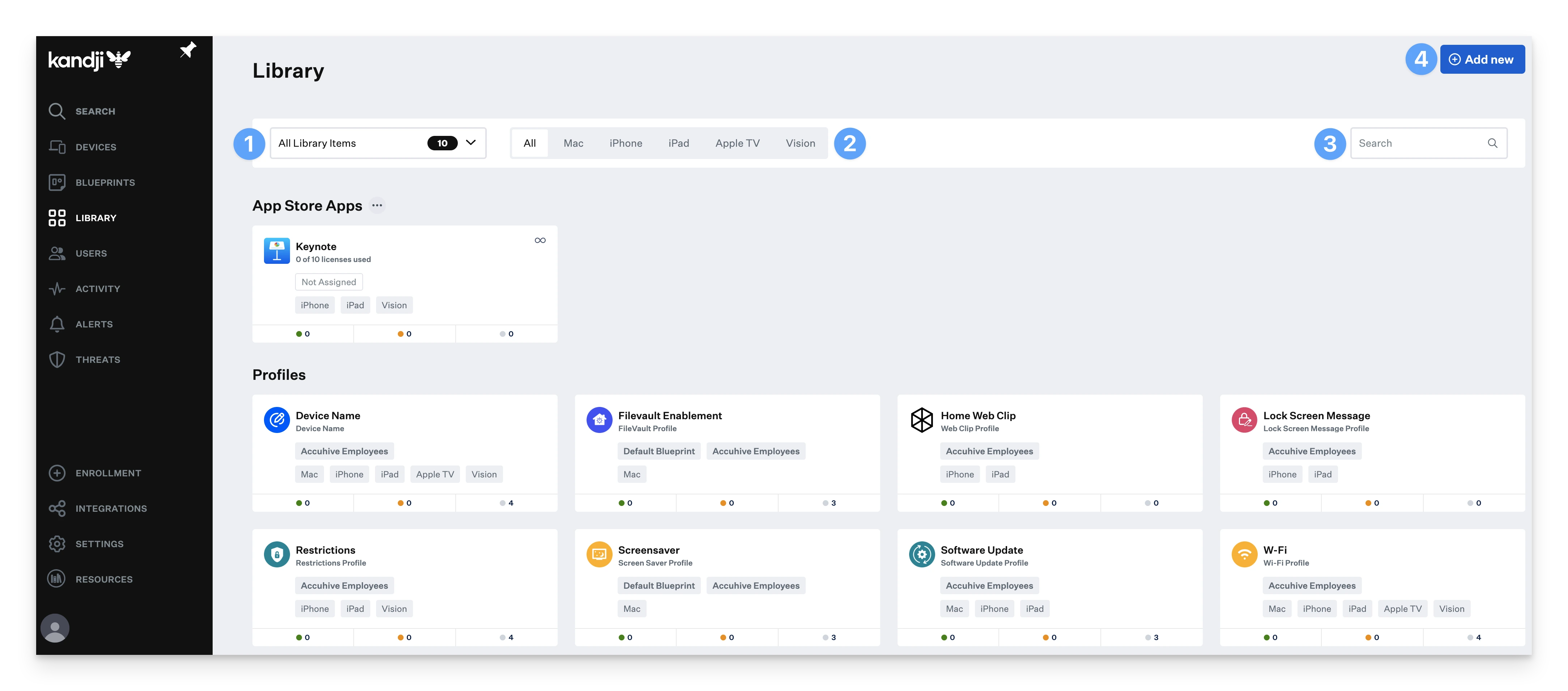
What is Kandji?

Kandji is a modern Apple device management (MDM) platform designed to automate IT tasks and enforce security across macOS, iOS, iPadOS, and tvOS devices.

Expert Setup & Onboarding

Ongoing Management & Support

Custom Policy & Compliance Configuration

Zero-Touch Deployment with Apple Business Manager

Automated Updates & Security Enforcement

Kandji Core Features

FULLY AUTOMATED OS UPDATES & PATCHES

Flexible scoping for apps and settings

200+ pre-packaged business apps

one click cis compliance templates

customized setup assistant experienced

threat detection & response

Frequently Asked Questions

Is Kandji only for Apple devices, or can it manage other platforms too?

Kandji is specifically designed for Apple products — including macOS, iOS, iPadOS, and tvOS. If you need to manage non-Apple devices (like Windows or Android), we can recommend additional tools that work alongside Kandji.

What is Kandji and why would my company need it?

Kandji is a powerful Apple device management (MDM) platform that helps businesses automate how they deploy, manage, secure, and update their Apple devices — like MacBooks, iPhones, and iPads. If your company uses Apple products, Kandji makes managing them easier, safer, and more consistent.

Do I need Kandji if we already use Apple devices in our company?

Yes — even if you already use Apple devices, managing them manually can be time-consuming and risky. Kandji automates tasks like app installations, software updates, security policies, and compliance enforcement, so your devices stay secure and efficient without constant hands-on management.

Can I use Kandji without any IT experience?

While Kandji is built for IT professionals, our managed service means you don’t need to be an expert. We handle the technical setup, monitoring, and updates for you — so you get all the benefits without needing deep IT knowledge.

What does Kandji actually do for my devices?

Kandji allows you to remotely manage devices across your company — including installing apps, enforcing security settings, monitoring compliance, locking or wiping lost devices, and automating updates — all from a central dashboard.

Will Kandji work for my remote or hybrid team?

Absolutely. Kandji is cloud-based, which means you can deploy and manage Apple devices no matter where your team is — in the office, remote, or on the go.

Do I have to install something on every device?

Kandji uses Apple’s Device Enrollment Program, which allows new devices to be automatically configured as soon as they’re turned on — no manual installation needed. We handle the setup so it’s seamless for your team.

Is my company’s data safe with Kandji?

Yes. Kandji follows strict security standards, and as your managed service provider, we ensure all configurations follow best practices for data protection, encryption, and compliance.

Can I track or lock a lost company device with Kandji?

Yes. Kandji allows us to remotely lock, wipe, or track lost or stolen devices, helping you protect company data even if the hardware is missing.

What happens if I stop using your service — do I lose control of my devices?

Not at all. If you ever choose to manage Kandji in-house, we’ll help transition everything over. You’ll retain control over your Kandji account and devices — no lock-in.

Don’t let device management
slow down your growth

Start today with fully managed Kandji services — fast setup, full control, zero hassle.

Kandji brand logo

Managed by Experts, Trusted by Enterprises.

Let us handle your Apple fleet with Kandji — automated compliance, zero-touch deployment, and 24/7 oversight by experts.

What is Kandji?

Kandji is a modern Apple device management (MDM) platform designed to automate IT tasks and enforce security across macOS, iOS, iPadOS, and tvOS devices.

Expert Setup & Onboarding

Ongoing Management & Support

Custom Policy & Compliance Configuration

Zero-Touch Deployment with Apple Business Manager

Automated Updates & Security Enforcement

Kandji Core Features

FULLY AUTOMATED OS UPDATES & PATCHES

Flexible scoping for apps and settings

200+ pre-packaged business apps

one click cis compliance templates

customized setup assistant experienced

threat detection & response

Frequently Asked Questions

Is Kandji only for Apple devices, or can it manage other platforms too?

Kandji is specifically designed for Apple products — including macOS, iOS, iPadOS, and tvOS. If you need to manage non-Apple devices (like Windows or Android), we can recommend additional tools that work alongside Kandji.

What is Kandji and why would my company need it?

Kandji is a powerful Apple device management (MDM) platform that helps businesses automate how they deploy, manage, secure, and update their Apple devices — like MacBooks, iPhones, and iPads. If your company uses Apple products, Kandji makes managing them easier, safer, and more consistent.

Do I need Kandji if we already use Apple devices in our company?

Yes — even if you already use Apple devices, managing them manually can be time-consuming and risky. Kandji automates tasks like app installations, software updates, security policies, and compliance enforcement, so your devices stay secure and efficient without constant hands-on management.

Can I use Kandji without any IT experience?

While Kandji is built for IT professionals, our managed service means you don’t need to be an expert. We handle the technical setup, monitoring, and updates for you — so you get all the benefits without needing deep IT knowledge.

What does Kandji actually do for my devices?

Kandji allows you to remotely manage devices across your company — including installing apps, enforcing security settings, monitoring compliance, locking or wiping lost devices, and automating updates — all from a central dashboard.

Will Kandji work for my remote or hybrid team?

Absolutely. Kandji is cloud-based, which means you can deploy and manage Apple devices no matter where your team is — in the office, remote, or on the go.

Do I have to install something on every device?

Kandji uses Apple’s Device Enrollment Program, which allows new devices to be automatically configured as soon as they’re turned on — no manual installation needed. We handle the setup so it’s seamless for your team.

Is my company’s data safe with Kandji?

Yes. Kandji follows strict security standards, and as your managed service provider, we ensure all configurations follow best practices for data protection, encryption, and compliance.

Can I track or lock a lost company device with Kandji?

Yes. Kandji allows us to remotely lock, wipe, or track lost or stolen devices, helping you protect company data even if the hardware is missing.

What happens if I stop using your service — do I lose control of my devices?

Not at all. If you ever choose to manage Kandji in-house, we’ll help transition everything over. You’ll retain control over your Kandji account and devices — no lock-in.

Don’t let device management slow down your growth

Start today with fully managed Kandji services — fast setup, full control, zero hassle.